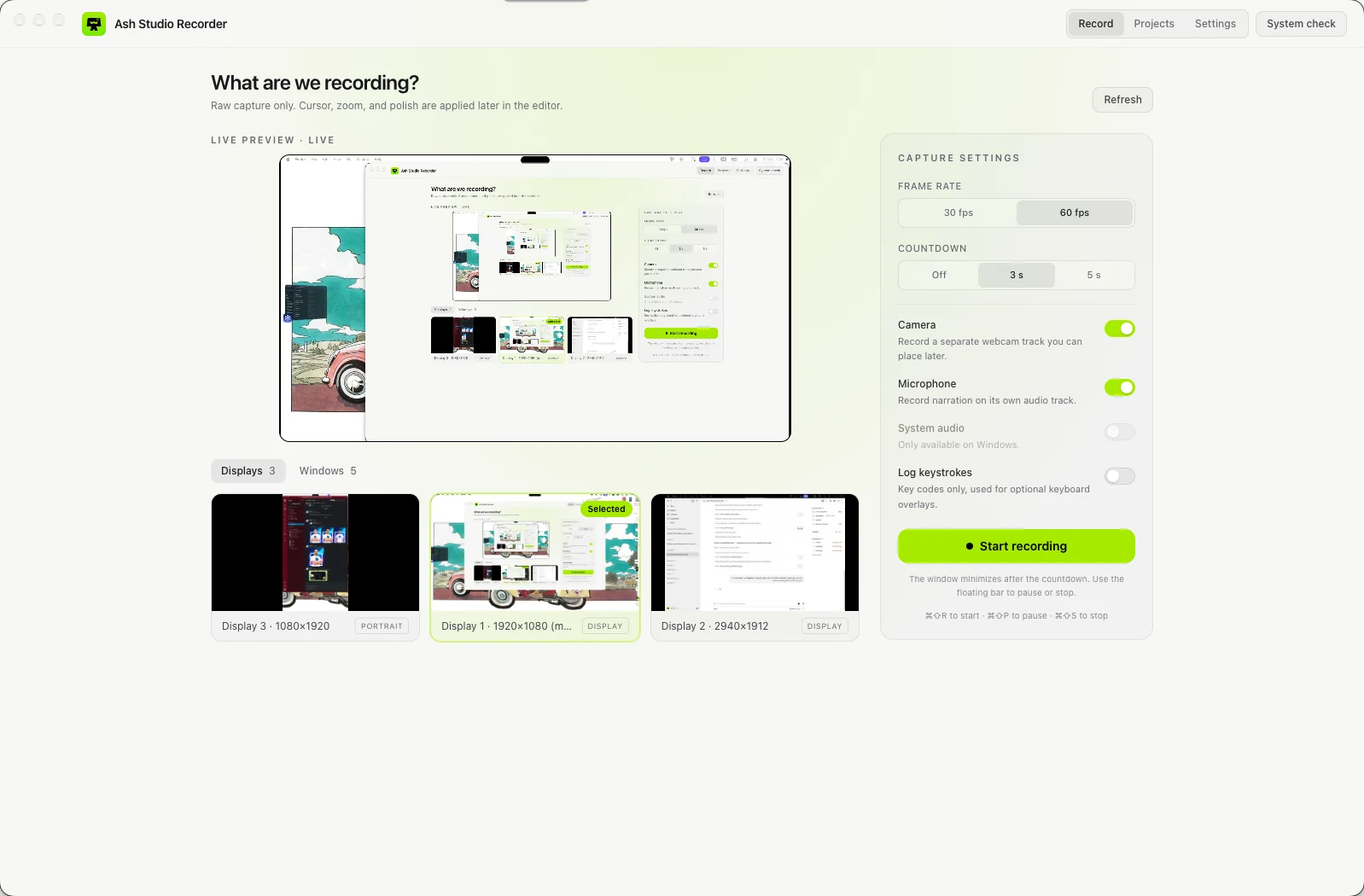
Record
Raw screen video, raw webcam video, and independent microphone and system-audio tracks. An event log stores mouse position, clicks, scroll, keystrokes, window bounds and timestamps alongside them.
Ash Studio Recorder captures raw screen, camera, mic and every cursor event separately — then rebuilds the frame live in the editor. Zoom, cursor, backgrounds and face cam stay editable forever, because nothing is ever baked into the video.
macOS (Apple Silicon) build available now · installers aren't code-signed yet, see first-launch steps.
Save raw data, then replay and render it. Every zoom, every cursor flourish, every background is computed from metadata — never burned into a pixel until you export.
Raw screen video, raw webcam video, and independent microphone and system-audio tracks. An event log stores mouse position, clicks, scroll, keystrokes, window bounds and timestamps alongside them.
The project file references the raw media and stores every editor decision. The editor rebuilds the frame live on a canvas from raw data plus your settings — nothing is pre-rendered, so every effect stays editable.
Export renders that same canvas frame by frame and encodes it with FFmpeg. Preview and export share one renderer, so what you see while editing is exactly what you get.
Grouped straight from the project's own roadmap — including what's only partly done, not just the highlight reel.
Full display, single-window or multi-monitor capture, with camera, microphone and system audio as independent tracks.
Zoom and cursor styling are computed from the event log, not recorded video.
Frame the recording like a produced clip — padding, shape, shadow, camera.
A conventional non-destructive timeline over the raw capture.
Frame-accurate export through the same renderer used for preview.

Every phase of the project, exactly as tracked internally — including what's not finished yet. This is pre-alpha software; see for yourself.
| Phase | Area | Status | Notes |
|---|---|---|---|
| 0 | Project setup | Done | Lint, format, typecheck, unit tests and CI. |
| 1 | Platform layer | Done | macOS and Windows implementations, typed IPC, permission onboarding. |
| 2 | Recorder | Done, needs device testing | Capture, cursor and key events, crash-safe chunks, recovery, stop-and-save. System audio on Windows is untested on hardware. |
| 3 | Project system | Done | Schema v2 with migrations, library with thumbnails, rename, duplicate, Trash, autosave, import and export as folder bundles. |
| 4 | Editor foundation | Done | Preview, timeline, trim, cuts, split, speed ramps, undo and redo, idle speed-up. |
| 5 | Auto zoom | Done | Click clusters, spring easing, follow cursor, manual segments, sensitivity. Per-segment easing choice is not exposed. |
| 6 | Cursor effects | Done | Smoothing, size, ripples, highlight, keystroke overlay. Cursor overlays need display captures. |
| 7 | Backgrounds | Done | Solid and gradient, padding, radius, shadow, aspect presets. Wallpaper and image backgrounds are not included. |
| 8 | Face cam | Partly done | Shapes, position, size, mirror, border, hide while zoomed. Background blur/removal is not included. |
| 9 | Audio | Partly done | Waveform, microphone volume, fades. Noise reduction and system-audio mixing in the editor are not included. |
| 10 | Export | Done | MP4, WebM, GIF; resolutions; 30/60 fps; progress and cancel; hardware option. GIF has no palette pass. |
| 11 | Performance | Partly done | Remux for seeking, range-served media, back-pressured export, local logs. Proxy previews are not done. |
| 12 | UX polish | Partly done | Keyboard shortcuts, settings, tray menu. Light theme, localization and a first-run tour are not done. |
| 13 | Testing | Done | Vitest, Playwright E2E, manual checklist. |
| 14 | Packaging | Done for unsigned builds | electron-builder for macOS (dmg, zip, arm64/x64) and Windows (NSIS, portable). Signing needs certificates. |
| 15 | Open source launch | Partly done | README, templates, landing page source. Demo video and GIF need a real recording. |
| 16 | Post-launch ideas | Not started | Presets marketplace, Whisper captions, annotations, mobile recording, plugin system. |
The app makes no internet connections. No account, no upload, no analytics — recordings are folders on your own disk, start to finish.
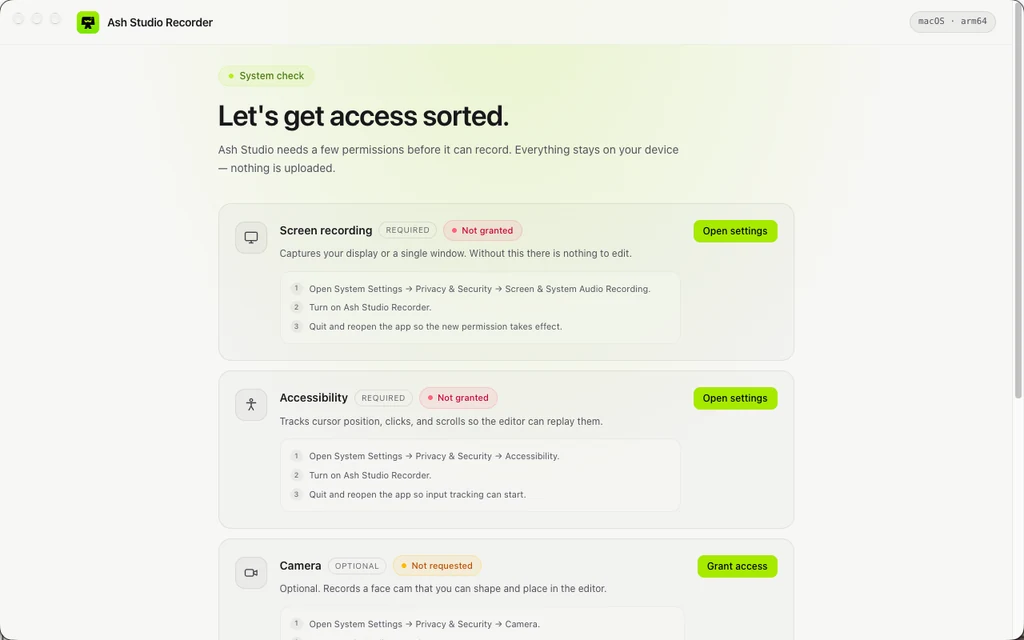
Captures your display or a single window. Without this there is nothing to edit.
Tracks cursor position, clicks and scrolls so the editor can replay them.
Optional. Records a face cam that you can shape and place in the editor.
Optional. Records narration on its own audio track.

Downloads only from the GitHub Releases page above — each file ships with a SHA-256 checksum so you can verify it wasn't altered.
| Your computer | File | Notes |
|---|---|---|
| Mac, Apple Silicon (M1 and later) | Ash-Studio-Recorder-mac-arm64.dmg | macOS 13+ |
| Mac, Intel | Ash-Studio-Recorder-mac-x64.dmg | macOS 13+ |
| Windows 10 / 11 | Ash-Studio-Recorder-windows-setup.exe | Installer, with uninstaller |
| Windows, no install | Ash-Studio-Recorder-windows-portable.exe | Runs from any folder |
Or run once in Terminal:
xattr -dr com.apple.quarantine "/Applications/Ash Studio Recorder.app"Windows SmartScreen may warn that the app isn't code-signed yet. Click "More info", then "Run anyway".
Yes. Ash Studio Recorder is open source under the MIT license — free to use, read and modify.
It's pre-alpha. Recording, the project library, the editor and export all work end to end. Some items are still open. Builds aren't code-signed yet, so both macOS and Windows show a one-time security prompt on first launch.
No. The app makes no internet connections. Everything — raw clips, the project file, exports — stays as folders on your own disk.
macOS 13+ (Apple Silicon and Intel) and Windows 10/11. A Linux fallback exists but isn't a target yet.
So zoom, cursor, backgrounds and face cam stay editable forever. Nothing is pre-rendered during capture — the editor and the exporter both read the same raw media and event log.
Yes — it's open source and contributions are welcome. Read CONTRIBUTING.md in the repository first.